How to Vibe Code for Free – Part 15: Onboarding Emails That Don’t Feel Like Spam
Keep your new users engaged (without annoying them)

Last week I was doing my usual inbox purge (you know, deleting thirty unread emails while pretending that’s organising my life) when I spotted one from an app I’d signed up for ages ago.
Out of curiosity (and mild avoidance of real work), I opened it… and immediately remembered why I liked that app in the first place.
Think Notion, or the way Duolingo knows exactly when to send you a nudge to keep your streak alive.

That’s when it clicked: onboarding emails aren’t old-school, they’re actually little reminders that your app still matters to someone.
If you’ve spent weeks vibe-coding your app into existence, don’t let it fade into inbox oblivion.
Here’s how to set up simple, friendly onboarding emails: the kind that make users feel guided, not guilt-tripped.
When you’re working in a vibe coding app like Lovable or Bolt, you can literally prompt them to customise the default Supabase emails in seconds.
Or, if you prefer a bit more control, you can plug in your favourite email tools: Resend, Mailchimp, ConvertKit, or whatever fits your flow.
The goal isn’t to “market” to your users. It’s to keep them connected… to remind them why your app made sense in the first place.
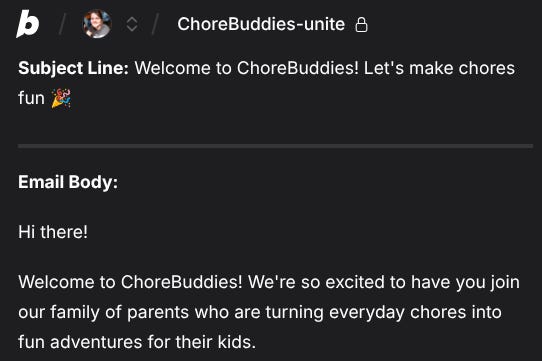
1. The Welcome Email → First Impressions Count
Your welcome email is basically your app’s handshake.
It tells users, “Hey, you made a good choice.”
It doesn’t need to be fancy. Just warm, clear, and human.
Keep it simple:
Remind them of the app's key function in one sentence.
Give them one action to take next (log in, add their first task, save their first recipe).
Add a small personal touch: a short note “from you” as the creator.
A good welcome email reduces instant churn. It’s that gentle nudge that says, “You belong here.”
Prompt to Paste:
“Draft a friendly welcome email for my app [describe app]. Keep it short, warm, and end with a single clear call-to-action.”
2. The “First Action” Email → Get Them to Do Something
The First Action Email is the Moment of Truth. If they don’t do this one thing, they’re gone.
If your app is a to-do list, that’s adding their first task.
If it’s a meal planner, it’s saving their first recipe.
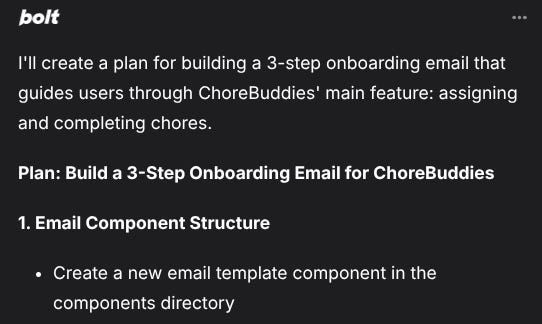
This email should gently walk them through that one moment: the “aha!” of your app.
Keep it visual:
Add a short GIF or Loom clip showing how to use the feature.
Include 3 quick steps: “Click this → Do that → Boom, you’re done.”
End with one clear CTA: “Try it now.”
It’s not about explaining every feature: just helping users succeed once.
That single success creates momentum.
Prompt to Paste:
“Create a short 3-step email that shows users how to try my app’s main feature. Keep the tone fun and beginner-friendly.”
3. The “Stick Around” Email → Build a Habit
You’ve won the first battle. Now, build the habit with something cool they didn’t know they needed.
This is your “Oh, that’s cool” email.
Think:
A small tip they haven’t discovered yet.
A use case from another user (“Maria used this to plan her family meals for a week!”).
Or just a little encouragement (“You’re already halfway there!”).
This email turns one-time users into regulars by showing your app has more depth.
Prompt to Paste:
“Write 3 onboarding email ideas that highlight advanced features without overwhelming the user. Keep them short, friendly, and story-like.”
4. The “We Miss You” Email → The Gentle Nudge
It happens.
Users vanish.
Life gets busy. Your app gets buried under a dozen notifications.
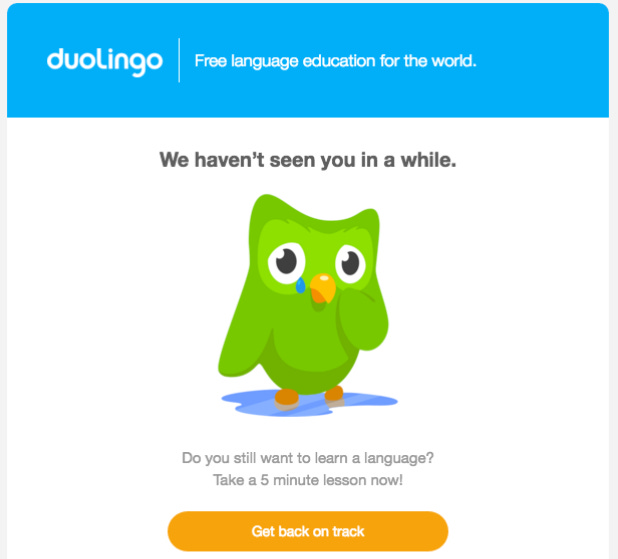
This email is your friendly knock on the door, not a guilt trip.
Keep it playful and low-pressure:
“Hey, just checking in 👋. We saved your progress… ready to jump back in?”
You can also mention something new since they last used the app (“We added dark mode!”).
A simple re-engagement email can bring back 10–20% of your dormant users.
Prompt to Paste:
“Write a re-engagement email for users who haven’t logged in for 7 days. Make it friendly, short, and include one clear reason to come back.”
Keep It Short, Keep It Human
Here’s the golden rule:
Your onboarding emails aren’t lectures, they’re little check-ins.
A few quick tips:
2–3 sentences max before the CTA.
One idea per email.
Avoid jargon. Use plain, human language.
Space them out (e.g. Day 0 → Day 1 → Day 3 → Day 7).
You don’t need to build an entire marketing pipeline, just a handful of friendly touchpoints that make your users feel guided.
🎉 Small Win (Do This Today)
Write a one-sentence welcome email right now.
Say what your app does, thank the user for joining, and give them one action to take.
Even before automating, send it manually to anyone who signs up this week.
That’s vibe coding energy = quick wins that move you forward.